
Operations
Restaurant equipment downtime — what it actually costs and how to stop bleeding it
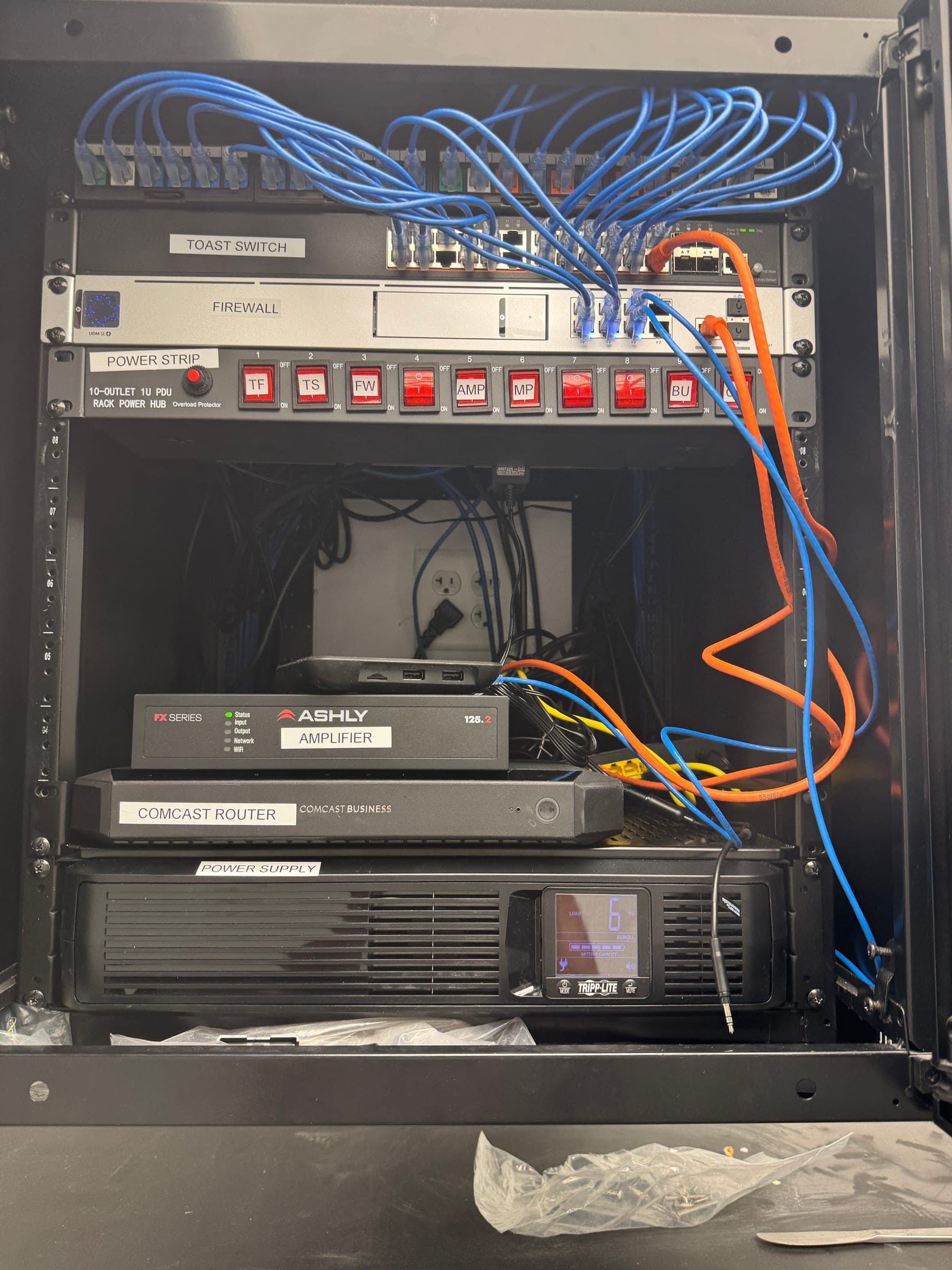
A single Saturday-night outage at a 200-cover restaurant walks away with $4,800 in dinner. Six discipline layers — UPS testing, LTE backup, standardization, documentation, monitoring, spare inventory — that catch most of it before it costs a shift.
Every operator has had The Saturday: the line stops moving, someone starts flipping breakers, and by the time the POS is back you've handed away $4,800 worth of dinner and a fistful of one-star reviews. The reflexive fix is to buy more insurance — a second ISP, a bigger UPS, a Toast rep on speed dial. Those help, but they don't solve the problem. The problem is that downtime is treated as a crisis to react to rather than an operational discipline to run.
This is the playbook we run when an operator says "we can't afford another one of those Saturdays." It's what you actually install, what you actually test, and what you actually document.
What's actually breaking on a restaurant floor?
Downtime in a modern restaurant comes from a small number of predictable failure modes. Named honestly, in rough order of what we see:
- Hardware wear-out — SSDs and drives at 5+ years, UPS batteries that quietly died two years ago, switch power supplies, motherboards that flake under thermal stress.
- Network — bad switch ports from a lightning event you didn't notice, misconfigured VLANs from a well-meaning firmware update, DHCP conflicts from a rogue device, fiber cuts from the construction crew next door.
- Power — surges from the utility, UPS batteries that pass "the light is green" checks but can't hold 30 seconds under load, overloaded circuits after you added a new fryer, dirty grounding on a shared building.
- Human error — a firmware push that broke a POS driver, a firewall rule that quietly killed printer routing, a technician who unplugged the wrong Ethernet run.
- Environmental — network closet at 92°F because the AC vent is aimed at a compressor room, dust in the rack fans, water intrusion from a bar sink upstairs.
What does an hour of downtime actually cost?
The industry rule of thumb is "thousands of dollars per hour," which is unhelpful. Here's the honest math for a mid-volume restaurant:
- Direct revenue loss: at $1,200/hour of covers, an hour lost to a POS outage during dinner is $1,200 of walked-away seats. Two hours on a Saturday and you're at $2,400–$4,800 depending on how full your book was.
- Manual workarounds: paper tickets slow the line by ~35%, so even a partial outage bleeds ticket time all shift.
- Support and rush costs: after-hours dispatch, weekend rate labor, expedited-shipping replacement gear — a bad night can add $600–$1,800 in one-time recovery cost.
- Trust and reviews: harder to price, but three angry Google reviews from a rough Saturday take months to average back out.
- Compliance risk: PCI 4.0 requires uptime on the monitoring layer, not just the POS. Camera or SIEM going dark during a payment window is a compliance flag on its own.
Multiply by the number of hours you're down and you get why the operators who take this seriously often save more in Year 1 than they spend on the whole prevention program.
Planned downtime is your friend — don't skip it
Every operator we've ever met has, at some point, tried to skip a maintenance window because "we can't afford to be down for two hours right now." That's how you end up down for eight hours, next Saturday, without a plan. Planned maintenance replaces aging gear before it fails, applies security patches, tests backups, and finds problems while a technician is on-site — not while the line is stopped.
The scheduling rules that actually work: Monday–Tuesday overnight for most restaurants (lowest cover volume, most staff sleep available), avoid the first and last week of any month (payroll close, inventory), and hard-cap any single window at 3 hours so a bad plan doesn't cascade into open.
How do you actually reduce unplanned downtime?
Six overlapping disciplines. Nothing exotic. All of them cost less than a bad Saturday.
1. UPS on a real test cadence
Every UPS in the building gets load-tested quarterly. "The light is green" is not a test. A test means we simulate a power event and confirm the UPS actually holds the runtime it's rated for. In our experience, one in three UPS units in restaurants ≥3 years old fails the first real test. Replace before the utility does the test for you.
2. LTE backup + dual ISP as default
Fiber is fast until the backhoe finds it. Cable is cheap until the neighborhood loses power. Every location should have a primary ISP and a managed LTE cellular fail-over, bonded at an SD-WAN appliance so the handover is sub-second and payment terminals don't reconnect. See [our network modernization playbook](/blog/network-modernization-multi-site-operators) for the specifics on the SD-WAN + LTE stack.
3. Standardization across every location
Same firewall model. Same switch model. Same UPS. Same rack layout. Same firmware version. When troubleshooting at 10pm, the difference between "I've seen this before, I know the fix" and "let me pull the diagram for this location" is 90 minutes of downtime.
4. Documentation your team can find at 11pm
Network diagram. Rack photos with labels. Device inventory with model numbers and firmware. ISP account info. VLAN map. Cabling map. All of it stored in one place your GMs can access from a phone in a walk-in cooler. Documentation that's 30% out of date is worse than none — it sends the technician to the wrong port.
5. Remote monitoring with humans, not just dashboards
Firewall health, switch uptime, AP status, ISP link state, device temperatures, UPS runtime, DVR retention — all monitored 24/7, all alertable to a human on-call who can page a technician. A dashboard that emails you a ticket at 3am is a filing cabinet, not a monitoring system.
6. A small on-site spare kit
Two spare 8-port switches, two spare APs, a UPS battery, three of each PoE injector and power brick, five of each Ethernet run, and a serial console cable. Under $2,000 per location. Turns a two-day rush-shipping saga into a 45-minute swap.
The 90-day rollout that actually works
How to roll out a restaurant downtime-prevention program in 90 days
- 01
Week 1 — Baseline every location
Walk every site with a checklist: UPS ages, switch models, firmware versions, network closet temps, cable labeling, existing documentation. Photograph everything. Build the gap list before touching anything.
- 02
Week 2 — Test every UPS and load-test every ISP
Battery load test on every UPS. Pull the primary ISP cable and time how long it takes to recover — if the answer is "minutes" or "manual," that's Project 1.
- 03
Week 3–4 — Deploy LTE backup and cloud-managed networking
Managed cellular router as a primary fail-over, cloud-managed firewall/switches so future changes are centralized. Sub-second automatic failover at the SD-WAN layer.
- 04
Week 5–6 — Standardize the fleet
Same firewall, same switch, same AP model at every location. Where possible, same firmware version across the fleet. Cost of hardware ≪ cost of a bad Saturday.
- 05
Week 7–8 — Documentation and spare kits
Network diagrams, rack photos with labels, device inventory. Ship a spare kit ($1,500–2,000) to every location. Store documentation somewhere a GM can find it from a phone.
- 06
Week 9–12 — Monitoring, quarterly cadence, and drills
24/7 monitoring live, quarterly preventive maintenance calendar built, one live-fire fail-over drill per site (pull the ISP cable and watch the LTE take over) so you know it works before you need it. Post-mortem every incident for the first year.