
Security
Preventing employee theft in restaurants — the tech stack we actually deploy
Restaurants lose more to slow internal drips than to bold theft. Seven prevention layers — from biometric clock-ins to immutable POS logs to refund holds — that stop most of it before a manager has to spot it on a report.
Our earlier post — [Seven ways your POS is leaking cash](/blog/seven-ways-your-pos-is-leaking-cash) — was about how to spot theft after the fact by running the right POS reports. This one is the other half of the conversation: what to install so most of it doesn't happen in the first place. Detection catches; prevention deters. You need both, but prevention is where the bigger compounding savings live.
Below is the layered stack we put in place when an operator says "I think we have a leak and I'm tired of policing it personally." None of it is novel. All of it is vendor-agnostic. The discipline is in deploying the layers together, not one at a time.
1. Cash drawer + register — exception reporting tied to video
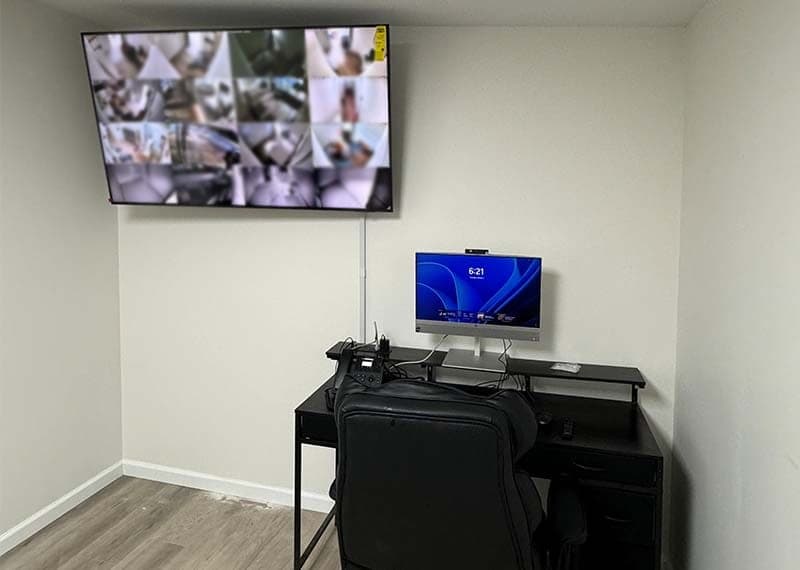
Smart cash drawers reconcile after every sale and flag discrepancies in real time. Paired with POS exception reports (voids after close, refunds over a threshold, drawer-opens with no sale) and a camera angle on the register, you get a 30-second forensic trail for every event you'd want to investigate.
- Drawer events bound to the POS transaction ID — not a generic timestamp.
- Cameras synced to POS event stream so review jumps to the exact frame in one click.
- Blind drops at close: a second person verifies deposits without knowing the expected total.
- Daily exception report mailed to the GM — not weekly, not monthly. Daily.
2. Inventory — real-time theoretical vs. actual, with surprise counts
An operator without recipe-cost-driven theoretical inventory is flying blind. The fix is a platform (Toast xtraCHEF, CrunchTime, MarketMan, Restaurant365 — vendor-agnostic) that compares theoretical against actual every shift and flags variance over a configured threshold.
- Recipes built once and audited quarterly. Without correct recipes, theoretical is fiction.
- Surprise stock counts on rotation — overhead camera over the dry store helps make these honest.
- Blind counts where the counter doesn't see the theoretical number until after they submit.
- Waste log accessible only on a tablet at the station — every dump is timestamped, photographed, and bound to a reason code.
3. Payroll — biometric or geofenced clock-in
Buddy-punching costs the average multi-unit operation 1–3% of labor a year. The fix is biometric (face or fingerprint) or geofenced mobile clock-in that won't accept a punch outside a defined radius of the store. Pair with a labor-audit feed that flags early clock-ins and clock-outs that don't match POS activity.
- Biometric clock-in is built into most modern POS terminals — turn it on, train the team, audit punch corrections weekly.
- Geofenced mobile clock-in is a backup for back-of-house staff without terminal access — defined radius ≤ 50m of the store.
- Auto-flag clock-ins more than 7 minutes before scheduled start without manager approval.
- Cross-reference clock-in against POS activity — if someone is on the clock for two hours and rings zero tickets, that's a flag.
4. POS + back-office — immutable logs, role-based access, dual-approval thresholds
Modern POS platforms ship with immutable audit logs and granular role-based access controls. Most operators leave these at the defaults. Tighten them.
- Every user gets a unique named ID. No shared "manager" account, ever.
- Role-based permissions: line server cannot void after close, shift lead cannot edit menu prices, only the GM and above can run a manager override.
- Dual approval required for: refunds over $25, comps over 15% of ticket, price overrides, manual cash adjustments.
- Reopened or deleted tickets generate an immediate Slack/SMS alert to ownership.
- Quarterly audit of who has manager-level access and who's still active. Stale accounts get disabled.
5. Refunds, gift cards, and loyalty — automated holds
Refunds and loyalty redemptions are the most-abused channels because they look like legitimate transactions until you look at the pattern. The fix is to slow them down enough that the abuse becomes visible.
- Real-time refund holds: any refund over a configured threshold pauses until a supervisor approves on a separate device.
- Loyalty analytics: redemptions scored against the device ID and purchase history of the enrollee. Same loyalty number redeeming at three locations in 20 minutes is a flag.
- Gift-card sold-vs-activated reconciliation daily. The 2022 industry report from Paytronix counted ~49,000 cases of gift-card fraud costing ~$228M. Most of that gets caught with a simple daily SQL job.
- Cash refunds are off by default. Refunds go back to the original method or to a store credit. No exceptions.
6. Insider data security — least privilege + endpoint lockdown
Insider data breaches account for ~9% of incidents per the 2024 Verizon DBIR, and stolen credentials are in half of all compromises. For restaurants, the practical insider attack surface is the back-office laptop and the POS terminal.
- Privileged access management: elevated rights granted on-request, auto-disabled after 30 days of non-use. CyberArk and BeyondTrust are the enterprise picks; Microsoft Entra PIM works for smaller operations.
- Endpoint lockdown — back-office laptops whitelist only approved applications. AppLocker (Microsoft) or Carbon Black do this well.
- Quarterly simulated-phishing micro-training. KnowBe4 is the standard.
- Hardware MFA tokens for anyone with admin-level access to the POS or processing portal. SMS MFA is no longer enough.
7. Anomaly detection — ML pattern flagging without alert fatigue
The newest layer is ML-based anomaly detection that profiles normal patterns per cashier, per location, per daypart and flags clusters of behavior that don't match. It works, but it's also where you can build a false-positive monster that nobody trusts.
- Start with one specific anomaly category — refunds clustered by cashier — not "detect all fraud."
- Tune the threshold to roughly 1–2 alerts per location per week. More than that, managers ignore them. Fewer, the detector isn't doing useful work.
- Every alert has a person who triages it within 24 hours. No backlog.
- Quarterly review of true positive rate. If the model never finds anything real after two quarters, retire it and reallocate the cost.
The 60–90 day rollout
How to roll out an employee-theft prevention stack in 90 days
- 01
Week 1 — Audit the current state
Walk every location with a checklist: shared accounts, cash drawer events, camera coverage, who has manager access. Build the gap list. Don't fix anything yet — just see what's actually there.
- 02
Week 2 — Tighten POS roles and dual-approval thresholds
Set up unique named users, role-based permissions, and dual-approval rules for refunds, comps, and price overrides. Most modern POS platforms support this out of the box; you're just turning it on.
- 03
Week 3–4 — Biometric or geofenced clock-in
Enable on every terminal. Train staff. Run two weeks of overlap with manual punches to catch edge cases. Then cut over.
- 04
Week 5–6 — Camera-POS event binding + smart cash drawers
Sync the camera DVR/NVR to the POS event stream so review is one click from a flagged transaction. Replace dumb cash drawers with smart drawers that reconcile per sale.
- 05
Week 7–8 — Inventory theoretical-vs-actual with daily flagging
Recipe build (or audit), platform install, threshold-based variance alerts. Surprise count rotation begins.
- 06
Week 9–12 — Endpoint lockdown, PAM, refund holds, ML pilot
Roll the back-office laptop hardening, privileged access management, automated refund holds, and a single-category ML anomaly detector. End with a quarterly review baked into the calendar.
The cultural layer (which nobody can ship)
Every operator we work with reaches the same conclusion eventually: the best prevention layer is paying staff well, scheduling fairly, and being honest about what's being monitored and why. Technology raises the cost of getting away with theft. A reasonable workplace lowers the motivation. You need both. We can deploy the technology in 90 days. The cultural piece is on you — and it's the bigger of the two.